Showing posts with label Indian mobile. Show all posts

Nokia Price in India

Nokia

Nokia 8800 Arte Rs.53100
Nokia E90 Communicator Rs.34700
Nokia N95 8GB Rs.24500
Nokia N82 Rs.19200
Nokia N95 Rs.18850
Nokia N78 Rs.18750
Nokia 7900 Prism Rs.17300
Nokia N81 8GB Rs.16000
Nokia E61i Rs.15800
Nokia N77 Rs.15000
Nokia N76 Rs.14100
Nokia 3250 Rs.13856
Nokia 6110 Navigator Rs.13200
Nokia 6500 slide Rs.13100
Nokia E65 Rs.12500
Nokia N73 Music Edition Rs.12500
Nokia 5610 Rs.12000
Nokia E51 Rs.11400
Nokia N73 Rs.11000
Nokia 6500 classic Rs.10200
Nokia N70 Music Edition Rs.9450
Nokia E62 Rs.9400
Nokia 7500 Prism Rs.9250
Nokia 3600 Slide Rs.9150
Nokia 5310 Rs.9100
Nokia E50 Rs.7950
Nokia 5220 XpressMusic Rs.7700
Nokia N72 Rs.7500
Nokia 6233 Rs.7000
Nokia 6300 Rs.6750
Nokia 3230 Rs.6750
Nokia 7610 Rs.6300
Nokia 5300 Rs.6050
Nokia 3500 Classic Rs.5500
Nokia 5200 Rs.4950
Nokia 5000 Rs.4800
Nokia 6085 Rs.4650
Nokia 3110 classic Rs.4425
Nokia 6080 Rs.3850
Nokia 2630 Rs.3450
Nokia 2760 Rs.3150
Nokia 2600 Classic Rs.3030
Nokia 6030 Rs.2550
Nokia 2626 Rs.2020
Nokia 1650 Rs.1850
Nokia 1600 Rs.1750
Nokia 1208 Rs.1450
Nokia 1110 Rs.1350
Nokia 1110i Rs.1350
Nokia 1200 Rs.1200

BlackBerry Pearl 8100

http://www.techoni.com.au/images/blackberry8100_l2.jpg
Price - Rs. 9,999.00

The BlackBerry Pearl 8100 smartphone is one of the world’s smallest smartphones and packs all of the power you expect from a BlackBerry smartphone. It comes complete with digital camera, multimedia capabilities and expandable memory. And it offers users everything else you would expect from a BlackBerry smartphone—including phone, email, web browser, text messaging (SMS and MMS), instant messaging, organizer applications and more.

The BlackBerry Pearl smartphone is small enough to take anywhere. It’s the ultimate combination of brains and beauty.

The good

The RIM BlackBerry Pearl is the first BlackBerry to offer a 1.3-megapixel camera, music and video playback, expandable memory, and a mapping application. The supersleek phone also continues to offer superior push e-mail capabilities, EDGE support, and Bluetooth....

The badThe bad

The RIM BlackBerry Pearl's microSD slot is inconveniently located behind the battery, and call quality was subpar in our tests. The phone's camera doesn't record video, and we wish there were external controls for the music player and integrated Wi-Fi.

Specifications
  • Dimensions (W x D x H): 2 in x 0.6 in x 4.2 in
  • Weight: 3.2 oz
  • Talk Time: Up to 210 Minutes (3.5 hours)
  • Standby time: Up to 360 hours (15 days)
  • 1.33 (8100 version) or 2.0 (8110/8120/8130) megapixel camera with flash, self portrait mirror, and 5x digital zoom
  • Media player with support for MP3, AAC, AMR, polyphonic MIDI and WAV sound formats
  • Media player with support for MPEG-4 and H.263 video formats
  • Bluetooth 2.0
  • Wi-Fi Access (only for 8120 & 8220)
  • High-Speed Cypress West Bridge USB (8110, 8120 and 8130)
  • Address book and calendar
  • HTML Web browser
  • GPS assisted BlackBerry Maps (8130 and 8110)
  • Push e-mail
  • Voice Dialing
  • Speakerphones
  • SMS and MMS text messaging (However, MMS requires WAP service)
  • Instant messaging
  • Supports up to 8GB MicroSDHC with handheld code 4.5

Setup of Mobile Broadband

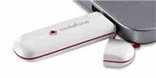
mobile broadband usb

How to Choose and Setup your Mobile Broadband


In today’s world, it seems almost impossible to get through the day without accessing the Internet.Especially if you are on tour or have to leave your office or home for some weeks then finding access points can be difficult.So for this reason, you must be interested in obtaining a mobile broadband service.The most obvious advantage to mobile broadband is the fact that it is quite convenient to use and you can connect to the Internet from any location.Various companies have now introduced solution for this and mobile internet is available through USB modems,dongles and mobile phones.

How to Choose the Right Ones

As for now,many companies have entered this area and it becomes a tough time for consumers to choose between right services for there needs.A quick tour of Broadband-Expert.co.uk helps us to choose between a variety of models and designs from their unique broadband deals.These people research, test and compare broadband and mobile broadband packages to help consumers find the best broadband packages for their needs.Here they have listed all the providers(3 Mobile,Vodafone,T-Mobile,Orange and more) along with their packages,speed,download limit,monthly price,setup fee and package ratings.Free laptops are also available from them as part of the deal.

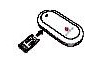
Remove the SIM card holder from the side of the modem. Slide the SIM card in as shown and make sure it’s in place.

Setting Up Mobile Broadband

usb modem sim card usb modem usb plug

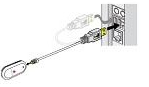
Put the SIM card holder back into the side of the modem.Plug the single end of the data cable into the modem as shown above.The software will start automatically from the USB modem and you are all set.

Broadband-Expert makes it very easy for new users to quickly learn about the technology, compare the offers of all the major carriers and choose a device and plan right for them.They also have an active forum where people discuss about different broadband service and posts their opinion about them.However while reviewing their site I found out the lack of video reviews and tutorials which could have given users an added advantage.But one thing what I really enjoyed was the their neat way of comparing and rating all the service providers without confusing the users.

Airtel free gprs

Airtel free gprs with teashark browser to use free airtel gprs

http://lh4.ggpht.com/renjithsmenon/SAEazXrFU6I/AAAAAAAAAzY/Hmcm2RmLs8o/AIRTEL%20FREE%20GPRS%5B3%5D.jpg
Everyone would love to access free airtel gprs and getting free airtel gprs is now made easy by teashark, a mobile internet browser which is also available as a free download just like opera mini. Whats most amazing is the fact that the working of this browser which enables it to provide free airtel gprs access without even changing any of the airtel gprs settings is still unknown.

To get this gem working, you first need to download this. The file can be easily downloaded from the following link: http://www.teashark.com/download.html. The downloaded file is an executable jar file which can be easily installed on any java enabled phone. The next thing you need to do to take you one step closer to free airtel gprs on your mobile phone is selecting the access point as airtel live from the teashark mobile browser. Once you are done with the above settings you are now ready to enjoy free access to airtel gprs.

In this paragraph I will try to inform you about all the installation hurdles which may come in your way to free airtel gprs on your mobile phone. The first and the foremost thing you need to take care of is to ensure that you have got airtel live activated on your phone for which you have to call the customer care and it is free of cost. Only then you should select airtel live as the access point. Another problem which you may encounter is that your phone may show white screen, if it happens then restart your phone. If it continues to happen you should better reinstall teashark and click on the yes option in case your phone asks you to clear previous data or overwrite previous data.

If you guys cannot get teashark working then the other way around to get free airtel gprs access is by downloading teashark from this link: http://mosh.nokia.mobi/content/422B3629768A1249E040050A453005BC. I guess this is another version of teashark which gets installed without any problem and you can access free airtel gprs.

Teashark however allows you to browse free but it does not allow free downloads. You will be charged usually for the downloads as the downloads are done through the phone’s browser and not through teashark. In some cases getting it to work may take upto 2 days and more than 50 tries. Moral of the story is getting the free airtel gprs on your phone is not easy infact getting anything free is not easy at all, so don’t lose heart and keep trying until you succeed.

Tata Indicom GPRS

Tata indicom low cost gprs


Most of the service providers like Vodafone, airtel etc provide very costly mobile internet and if by any chance you access your mobile internet through your pc, it’s one of the most sluggish internet access procedure. Tata indicom have come with a solution to this where they provide high speed mobile internet at very reasonable price.

But just to take full advantage of this plan you have to buy a Samsung set with Tata indicom connection in it. Samsung has integrated in it a very specially designed browser just to make the browsing experience more fun and more enjoyable. The phone costs approximately 6000 bucks but now I think it should be much less than 6000 bucks. So for all the gprs addicted people, this deal is not going to prove bad if in any case you are planning to buy a new phone.
However to talk about the drawbacks of the phone, it lacks Bluetooth, now that’s one hell of a drawback in this fast becoming wireless world.

Tata indicom provides unlimited usage for just Rs.99 per month but it is only applicable if you browse through your phone and if you use through your pc they charge you very heavily, it costs Rs.2 per mb. Moreover the coverage area of tata is also not wide so you can access internet in particular areas only.

 
Mobile Phones Blog | Features,Concepts,Applications and Prices © 2012 | Designed by Cheap TVS, in collaboration with Vegan Breakfast, Royalty Free Images and Live Cricket Score